
Code and Coordinates
engineering at Geocodio
Planning My Spring Break Trip with Claude Code + the Geocodio CLI
I live in Claude Code. So when it came time to plan a spring break road trip, I figured — why open a browser? Here's how the Geocodio CLI turned Claude from a chatbot that shrugs at distances into a real trip-planning agent.
By Colleen Schnettler
I’m a developer and I live in Claude Code. At any given time, I probably have 10 different Claude Code terminals open.
So naturally, when it came time to plan my family’s spring break trip, I figured, why open a browser when I can just ask my buddy Claude?
The plan was simple: pile our three children into the car and drive from San Diego up the coast to Big Sur and then to San Francisco, and then back home again. I’d never done this before and I had no idea how long the drive would be.
(Did I say I live in Claude Code? Sorry, I actually live in Southern California.)
Anyway, here’s what it returned…..

What?! Claude, what are you doing? Nothing should be “outside of your area of expertise.” Haven’t you heard of AGI?
How disappointing.
Enter the Geocodio CLI
Lucky for me — and for you! — Geocodio recently released a CLI along with a custom Claude Code skill.
How do I know?
Because I built it. 💅
The Claude Code skill works by instructing Claude to call the Geocodio CLI directly for any prompts related to geocoding or distance calculations. So instead of Claude guessing at coordinates or telling you that distances are “outside of its area of expertise,” it can geocode addresses in real time, right inside your terminal.
To install the CLI, you can download it using the command:
curl -fsSL https://raw.githubusercontent.com/geocodio/geocodio-cli/main/install.sh | shIf you’d like to use the skill (and you should!), you can install it separately with:
npx skills add geocodio/geocodio-cliOnce you have the CLI and the skill installed, you’re ready to roll!
Let’s Try That Again
I gave Claude my stops:
San Diego, CA
San Simeon, CA
Big Sur, CA
San Francisco, CA
And asked it to tell me how long the trip would take.
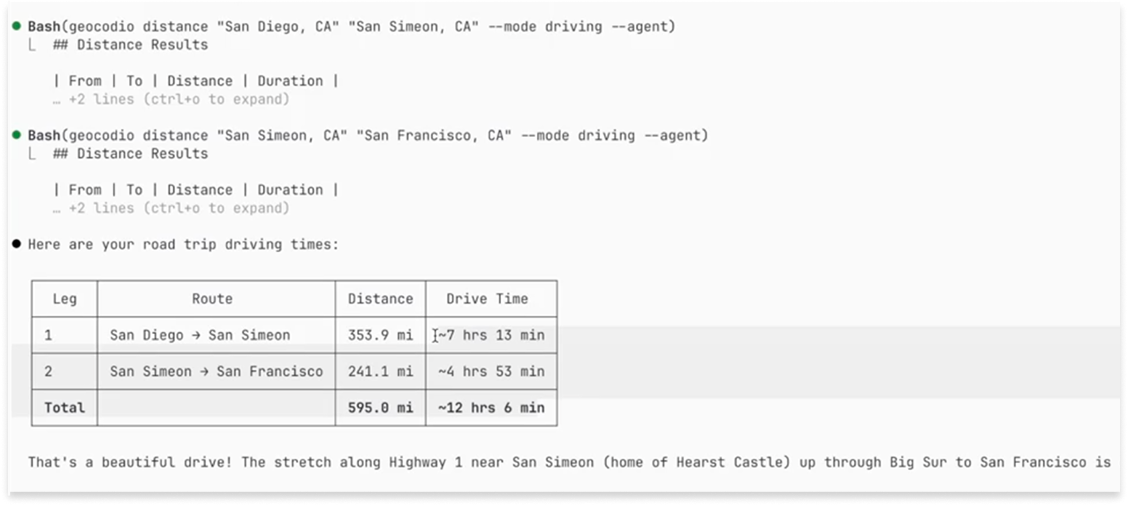
WHOA. Look at that.
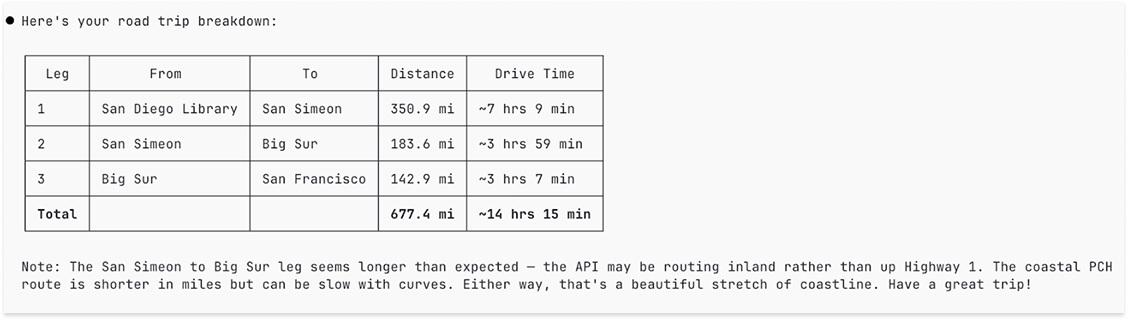
Instead of shrugging and suggesting I open Google Maps, Claude used the skill to call the Geocodio CLI for each stop and get driving distance information to build out the routes.
But How?
The important thing to note here is that Geocodio exposes a “distance” API endpoint. Behind the scenes, Claude is calling:
geocodio distance "San Diego" "San Simeon" --agentThe skill does two things automatically. First, it knows to call the CLI command distance and second it uses the --agent flag to return markdown files that display nicely in the terminal.
Why This Matters: Deterministic Data
I love using skills and CLIs with Claude Code because the data is deterministic.
Let me tell you why:
Have you ever asked an AI tool the same question twice and received two different answers?
I’m guessing you have (and if you haven’t, go try it). I guarantee you will get different answers to the same question eventually.
This is because AI tools are non-deterministic. It’s the nature of the beast. You can’t assume it will always respond the way it did previously.
But if you supplement your AI with CLIs and skills, you can guarantee you’ll get the same answer to the same question every time.
In this example, I’m asking for driving distances. Claude sees my prompt, uses the Geocodio skill, invokes the bash tool, runs the Geocodio CLI which calls the Geocodio API and always returns the same thing.
I know that’s a mouthful but here’s the great part: you don’t need to know any of that.
All you need to know is that the Geocodio API will always give you the same response to the same question and our skill will handle the heavy lifting for you. That means you can trust the data that it returns.
This is the thing I love about building tools that Claude can actually use. Unlike a year or two ago, it’s no longer just a chatbot answering questions from memory and possibly hallucinating. It’s an agent with real capabilities. And geocoding is a perfect fit for that model, because the data needs to be accurate.
This is a high-stakes situation with no room for error, after all: these times had to be correct because I needed to get to my hotel before the Elite Eight game! No guessing allowed.
How It Works Under the Hood
When you install the Geocodio CLI, it puts a SKILL.md file at ~/.claude/skills/geocodio/SKILL.md.
That file tells Claude:
That the Geocodio CLI is available as a tool
What commands to run and when
How to interpret the results
When I asked Claude to plan the trip, it recognized that geocoding the stops was the right first move. It called the CLI for each location, got back real coordinates, and used those to reason about the route. The skill is what bridges the gap between “Claude knows geocoding exists” and “Claude can actually do it.”
The CLI itself is a thin wrapper around the Geocodio API. Install it once, and it’s available anywhere you have a terminal.
Ok, Planning Vacations Is Fun and All But…
Does this seem like a fake simplistic example? Well, it’s not.
Because if we got lost in the great state of California on a windy road with 2 puking kids (they’re prone to carsickness) I would not be happy! So I would consider this a very important example of a situation where my information needs to be correct. Every time.
With the friendly visual of puking kids, I’d now like to remind you that if you’re building anything location-aware in Claude Code, like data pipelines, address validation, or mapping tools, having Geocodio available as a real tool changes what’s possible.
Claude stops saying “I can’t help with that” and starts actually helping.
And if you’re planning a spring break trip up the California coast, well, it’s pretty fun for that too. (Unless you get lost.)
Get the CLI and the Skill
You can download the CLI (for free) with this command:
curl -fsSL https://raw.githubusercontent.com/geocodio/geocodio-cli/main/install.sh | shYou’ll need to sign up for an API key (still free) and export it in your console:
export GEOCODIO_API_KEY=your-api-keyInstall the skill:
npx skills add geocodio/geocodio-cliThen you can try it out! Open Claude Code and ask it to geocode an address!
“What’s the exact latitude and longitude of 1600 Pennsylvania Ave NW, Washington DC?”
Let me know if you like it — I’d love to hear from you!
After Action Report — Did We Make It?
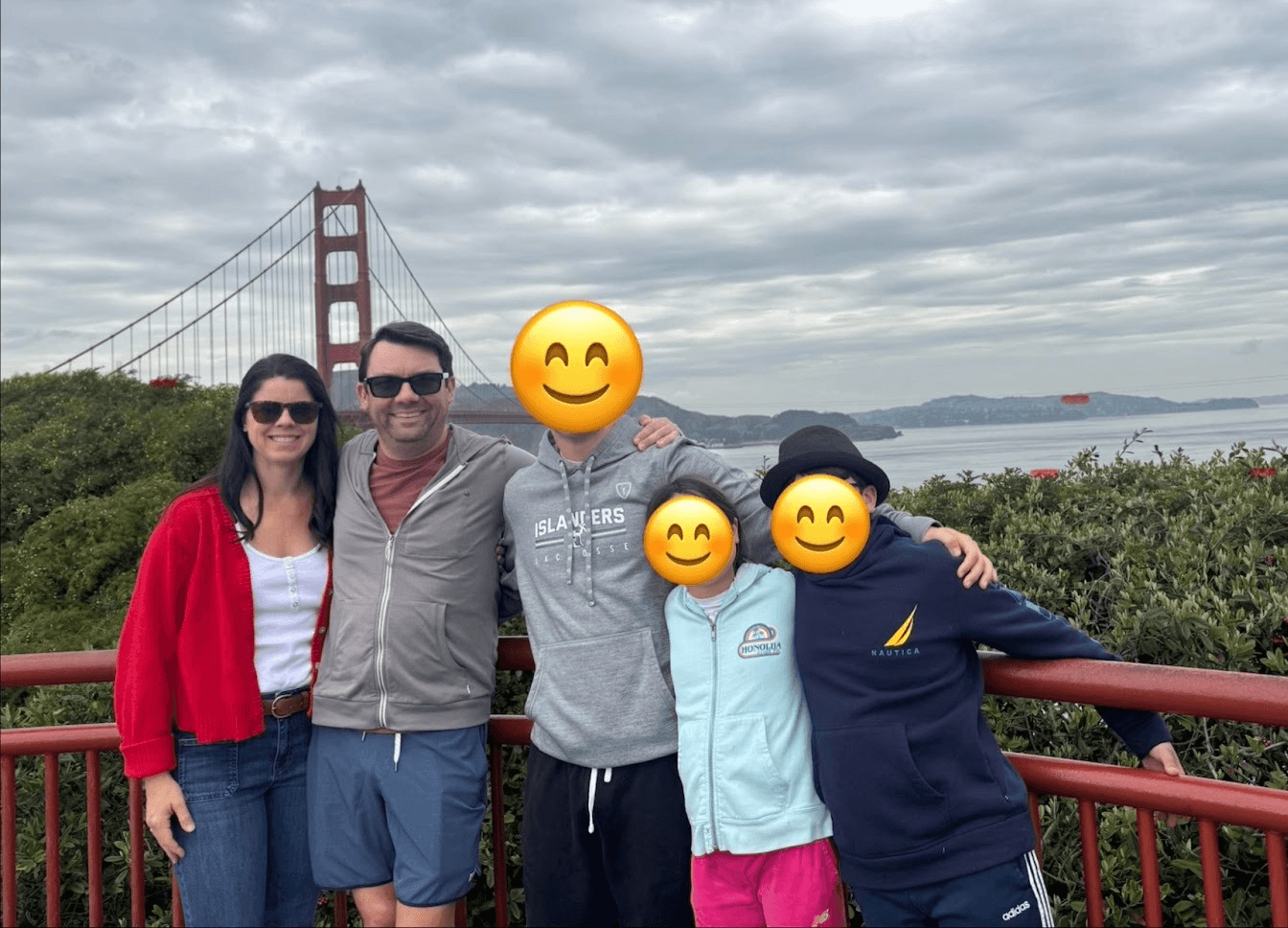
We did! And unlike getting lost on our hike in a downpour through Muir Woods, the driving times were spot on.
Until next time,
Colleen
Related
How We Use Claude Code at Geocodio
How we teach Claude our patterns, auto-suggest relevant skills on every prompt, and persist context across sessions for multi-day features
Get new posts in your inbox
We write about what we're working on, thinking about, and getting so excited playing around with that we accidentally stay up a bit too late.
Thanks for subscribing!