
Updates
on everything Geocodio
Using AI with Geocodio? Keep your agent from going rogue with a usage limit
AI agents are helpful, but they aren't always the most careful when it comes to running up a bill. Here's how to prevent that.
Back in April we shipped a Geocodio CLI along with an agent skill, so Claude Code, Cursor, Codex, and friends can geocode on your behalf. Watching people wire it into their workflows has been one of the more fun parts of this year.
It also means a lot of Geocodio API keys now live in the hands of something that works fast, works overnight, and has no feelings whatsoever about your credit card bill.
Unless you’ve given it guardrails, an AI agent might not know that the retry loop it wrote will fire forty thousand times, leading to usage costs that are 40,000x higher than you expected.
Good news: you can give it a hard ceiling in about thirty seconds. Here's how, plus a few things worth teaching your agent while you're in there.
Why agents can burn through lookups faster than people do
Retries. A person who gets an error reads the error. An agent's first reflex is to try again. Wrap a batch call in a generic retry decorator and one bad afternoon turns into thousands of paid requests.
Loops. "Geocode every address in this table, then go back and check the ones that didn't match" can quietly become "re-geocode the whole table on every pass."
Test runs. An agent iterating on a script might run it fifteen times before it's satisfied. If every run hits the live API with the full dataset, you paid for fifteen complete passes.
Enthusiastic enrichment. Every extra data field counts as another lookup. The math is addresses × (1 + fields). Ask for congressional districts on 2,500 addresses and that's 5,000 lookups, not 2,500. Tell an agent to "add all the useful geographic data" and it will take you at your word. That could mean it requests congressional districts, state legislative districts, census demographics, and more. Suddenly you're at 10,000+ lookups.
The solution: Add a usage limit to your account
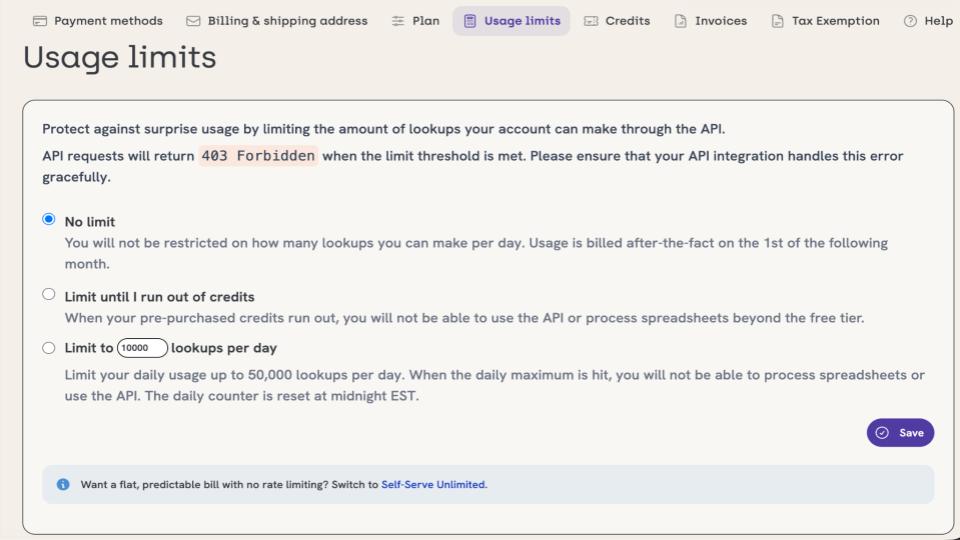
On the pay-as-you-go plan, you can cap your account at up to 50,000 lookups per day. Once you hit the cap:
API requests return
403 ForbiddenSpreadsheet processing stops
The counter resets at midnight EST
If you've pre-purchased credits, you can also tell Geocodio to fall back to the free tier once those credits run out. Your ceiling becomes 2,500 lookups a day and a bill of $0.
You'll find the setting on your billing page. Full details are in the usage limit guide.
Picking a number
Pay-as-you-go includes 2,500 free lookups a day and charges $1 per 1,000 after that, so your daily limit translates directly into a worst-case daily spend:
| Daily Limit | Billable Lookups | Max daily spend |
|---|---|---|
| 2,500 (free tier fallback) | 0 | $0 |
| 5,000 | 2,500 | $2.50 |
| 20,000 | 17,500 | $17.50 |
| 50,000 (the maximum) | 47,500 | $47.50 |
Our recommendation: set your usage limit low to start. Validate your process and that the agent is doing what you’ve intended, then scale up as needed.
Teach your agent what a 403 means
A usage-limit 403 is not a temporary hiccup, and retrying it will not help. Requests past the cap are refused, so the retries themselves cost nothing, but your job will spin in a corner instead of telling you what went wrong. We suggest having the agent handle the status code deliberately:
import requests

class UsageLimitReached(Exception):
    pass

def geocode(address, api_key):
    response = requests.get(
        "https://api.geocod.io/v2/geocode",
        params={"q": address, "api_key": api_key},
    )

    if response.status_code == 403:
        raise UsageLimitReached(response.json().get("error", "Forbidden"))

    response.raise_for_status()
    return response.json()
Heads up
One wrinkle worth knowing: Geocodio also returns 403 when an API key lacks permission for an endpoint, such as our Distance API. Look at the error message in the response body for details.
Write the rules down where your agent will read them
Agents follow instructions in AGENTS.md, CLAUDE.md, and similar files far more reliably than they follow something you mentioned three prompts ago. A short block like this can save a lot of money:
## Geocoding

- Geocodio lookups cost money. Never wrap a Geocodio call in a blind retry loop.
- A 403 means we hit the daily usage limit. Stop and tell me. Do not retry.
- Unlike most geocoders, Geocodio allows you to store the data in most cases. Cache geocoded results to disk and reuse them. Do not re-geocode addresses we already have coordinates for.
- Test against a 5-row sample before running a full file.
- Every extra `fields` value adds to the lookup count (1 additional lookup per category)
- Only request fields I asked for.
- Ask the user how many records they expect to process per day. If you exceed this, stop.
That third rule matters more than it looks. Geocodio lets you store your geocoded results, so a local cache is fully allowed, and it's usually the largest savings available in an agent workflow. A given address geocodes to the same coordinates every time, so once you've looked it up, you never need to pay for it again.
A note on other plans
Usage limits are a pay-as-you-go feature, and pay-as-you-go accounts have one API key, which makes the limit your main guardrail there. On Flex or Unlimited you get multiple API keys, so a good pattern is to give your agent its own key with its own permissions, separate from anything production depends on. You can then track usage per key and download a usage CSV from the dashboard.
If you'd like a hard cap on a subscription plan API key, send us a note and we'll talk through the options.
Good to know: Other resources for your agents
Geocodio has several pages that it might be helpful to point your agent to in order to make sure it’s doing what you expect (and not doing what you don’t expect it to):
Geocodio’s AGENTS.md, which makes sure your agent follows software engineering best practices for using an API and doesn’t run up a surprise bill
Markdown version of the Geocodio API docs
Geocodio CLI and agent skill
Two minutes now, no surprise invoice later
In sum:
Set the limit
Add the rules to your AGENTS.md and point it to our AGENTS.md
Teach your agent that 403 means stop
If you run into anything odd, email us and a real person will get back to you.
Don't miss what's new
Geocodio ships new features and data updates regularly. We'll only email you with the good stuff, nothing else.
Thanks for subscribing! Check your inbox to confirm.