
Updates
on everything Geocodio
Geocodio Usage Page Refresh: Usage by API Key, Up to 5y of History, Request-Level Detail
Geocodio’s redesigned usage page now shows lookups by API key, team member, request type, and country. It also provides up to 60 months of history, a log of requests in the last 24 hours, and downloadable CSV exports.
If you’re using Geocodio for client projects or want greater visibility into the status of a particular recent request, the usage page on the dashboard now has much more detailed information.
You can see where your lookups came from by API key, team member, request type, or country. You can also drill down into a single recent request to see the accuracy information and response time
The new usage page resulted from conversations with customers. Here’s what you told us you needed:
Surfacing the source of a usage spike: Group daily lookups by API key to see which integration, environment, team member —or, as is increasingly common, agent—drove the spike. (Tip: If you’re using AI agents or automated jobs, you might want to consider pointing your agent to our AGENTS.md.)
Splitting costs across teams or clients: Export daily usage by API key to allocate costs to the teams, projects, or customers behind each key.
Debugging a single request: See what Geocodio received, how the request finished, and all other request details, including which API key sent it.
Seeing usage over time: Look back up to 60 months to plan budgets, prepare for renewals, or make other plan-related decisions.
Distinguishing between no results vs errors: Requests that matched nothing, such as requesting a school district appends in Canada (which we don’t support), are shown separately from 422 and 403 errors. We only charge for successful lookups.
What’s On the New Usage Page
The usage page now has three tabs: Overview, History, and Recent lookups.
For a detailed walkthrough, see Understanding your usage page.
Check out your new usage page: Self-Serve | Enterprise
Overview
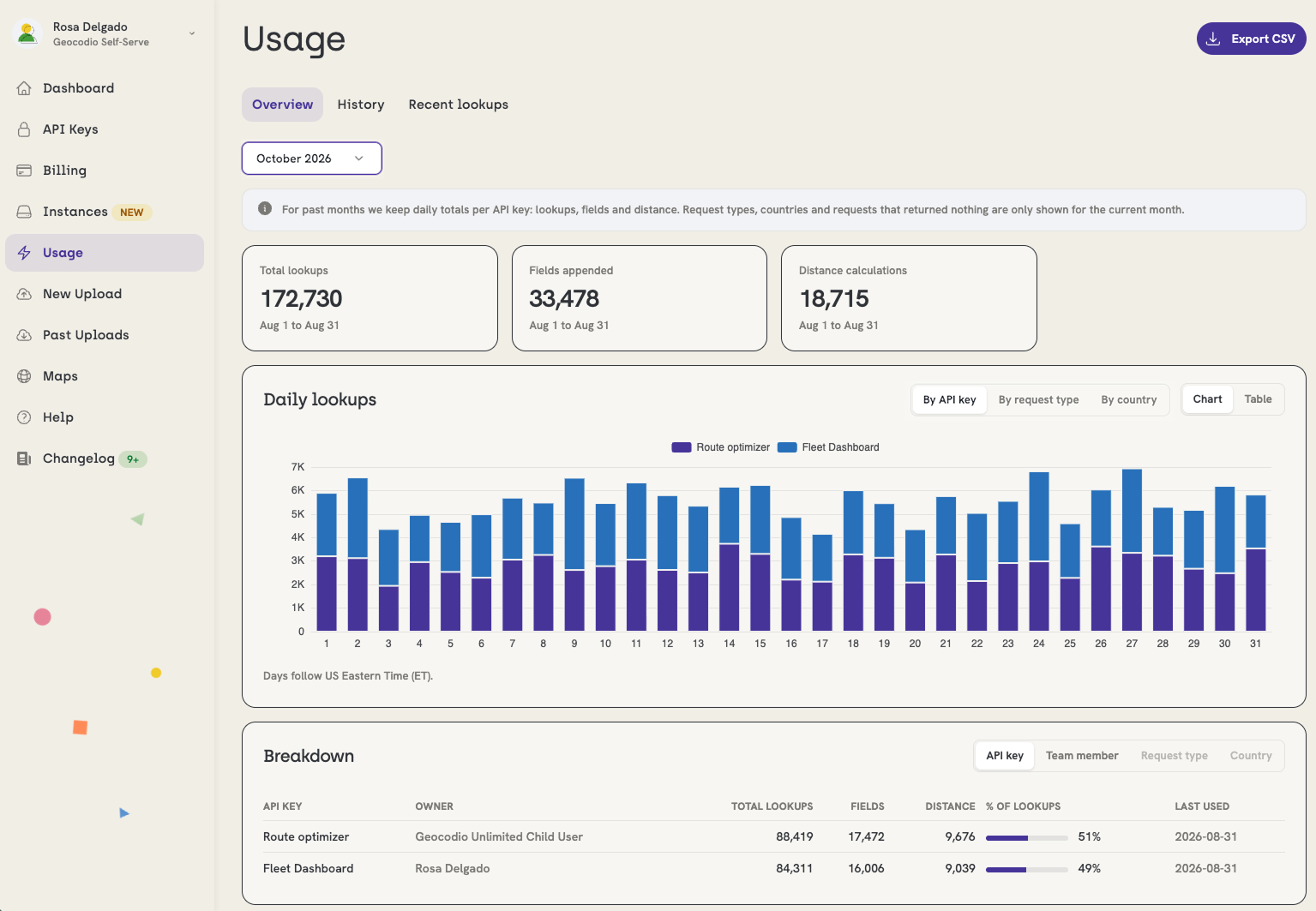
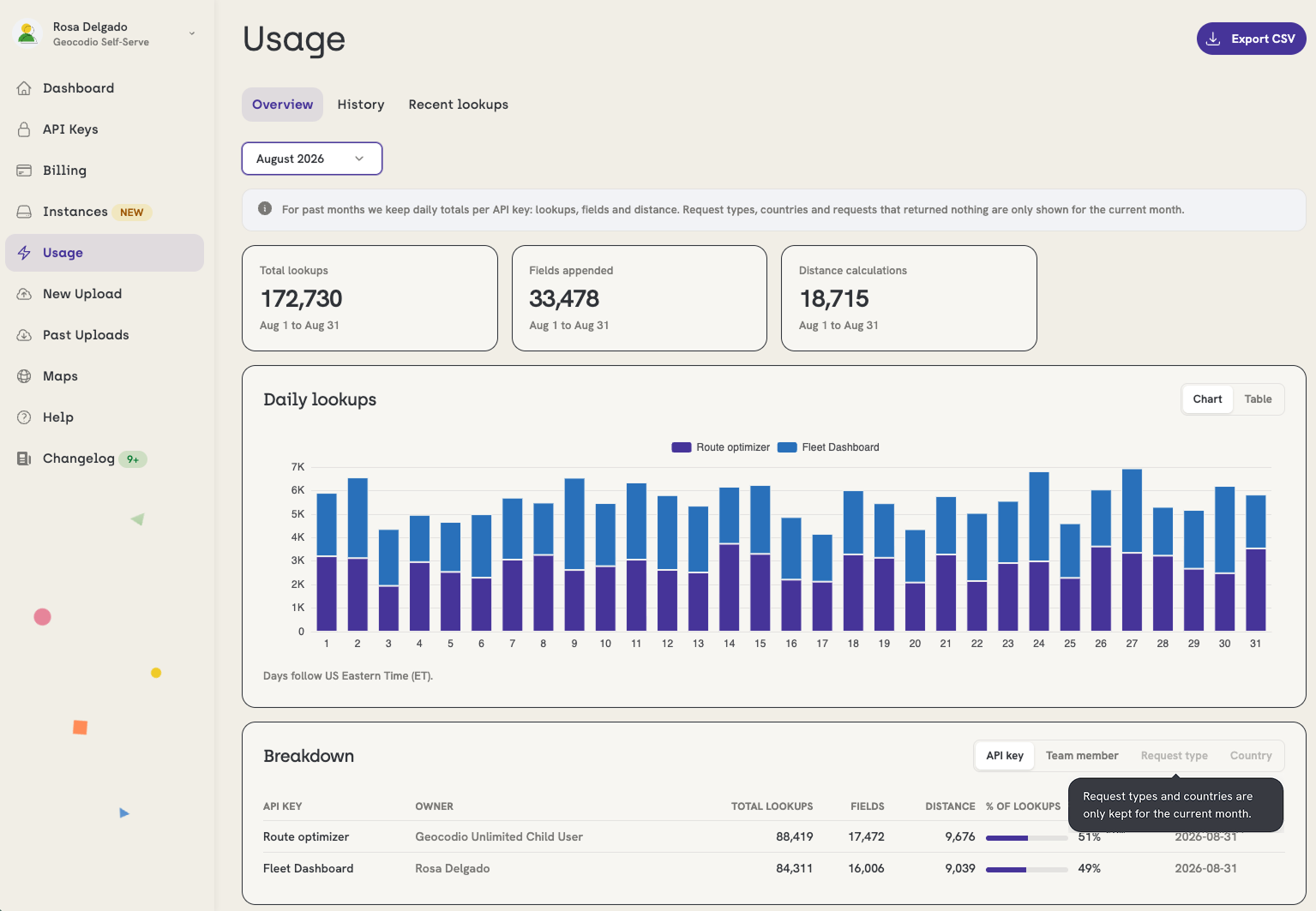
Overview shows you usage across an entire month, and you can choose from a chart or table view.
Pick a month from the dropdown, and you’ll see:
Summary cards for the month (e.g., Lookups this month, busiest day)
A Daily lookups chart you can view as a chart or table, grouped by AP key, request type, or country
A Breakdown table that regroups the month by API key, team member, request type, or country, with lookups, fields, distance calculations (if applicable), credits used (if applicable), share of total, and when each row was last used
The option to export as CSV
Lists API Usage
Before May 2025, a bug caused all Lists API usage to be grouped under "spreadsheet uploads." We fixed it in May 2025, so usage from that point on appears under the API key used to upload each list.
Recent Lookups
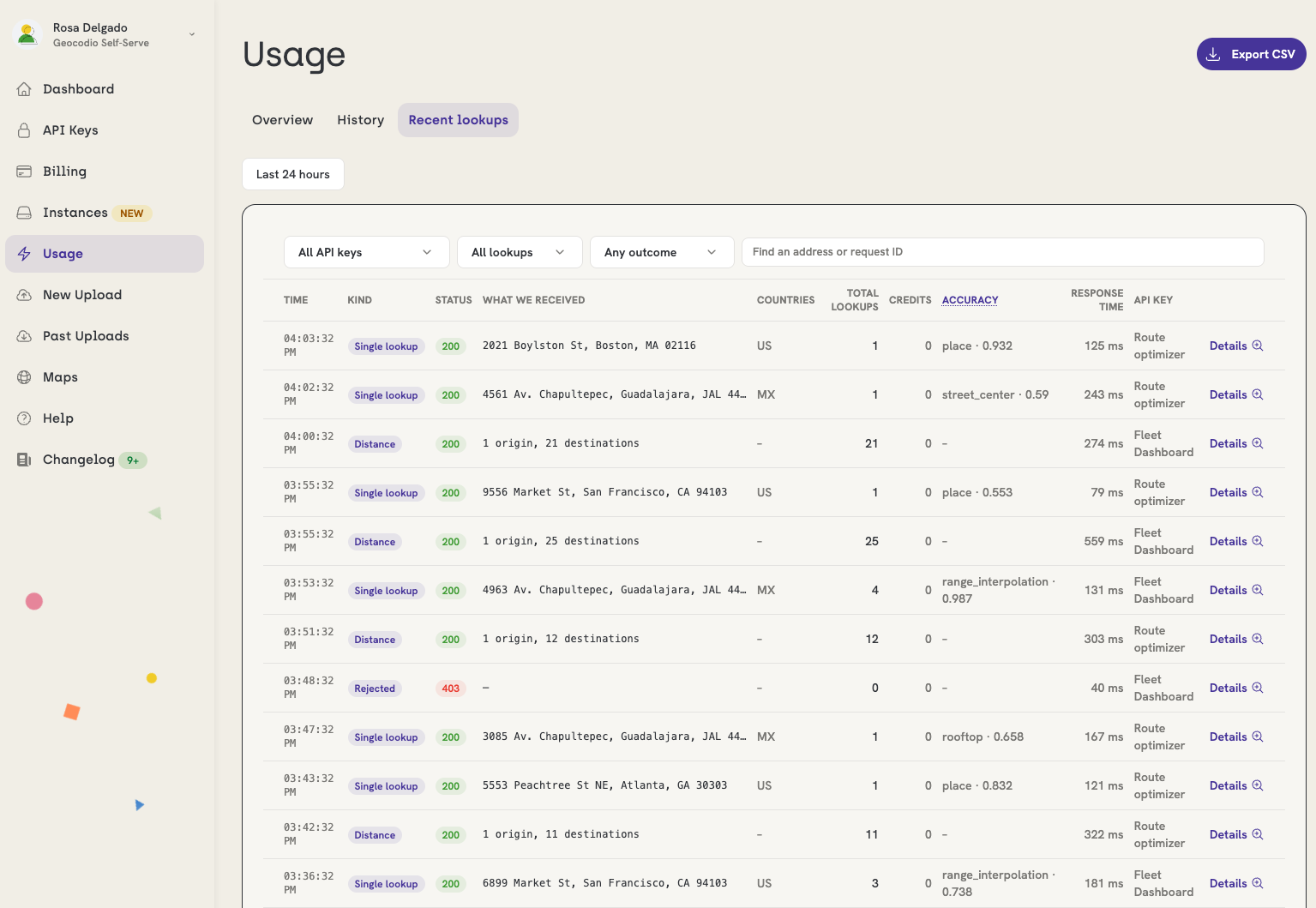
Recent Lookups is a rolling log of the last 24 hours of usage, newest requests first, with one row per request. If you click any row, you can get the following details: what Geocodio received, the status, the accuracy type and score, the total response time, and the API key used.
A batch request shows up as a single row with its size. A geocoded spreadsheet appears as one row once it completes processing.
If you want detailed usage going back further, use the History tab.
Billing Note
The usage page splits your activity into Lookups, Fields, and Distance so you can see where it came from. How you’re billed hasn’t changed. A data field append still counts as an additional lookup and uses one credit. See Credits and What's a lookup for details.
History
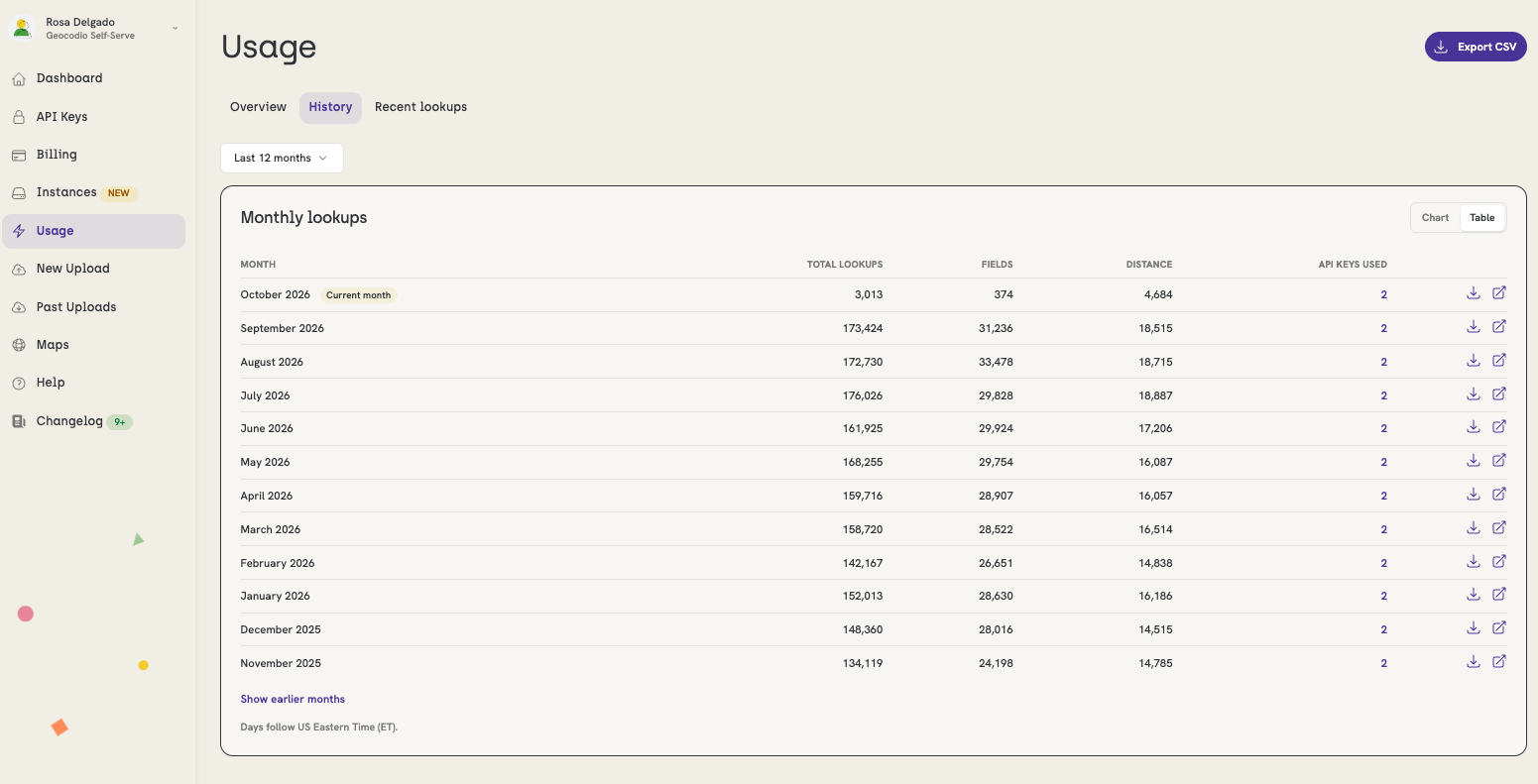
For usage greater than 12 months ago (but within 60 months), use the History view to get monthly lookup totals, with fields, distance calculations, and the number of API keys with active usage in that month. You can expand any month to see its breakdown by API key, view days its days, or download the data as a CSV.
The archive records activity rather than credit figures, so past months don’t show Included or Billable credits.
Exporting Your Usage
If you want your usage in a spreadsheet, click the Export CSV button on the usage page, choose a period, and pick a format:
One row per day: daily totals for the whole account, including included and billable credits
One row per day and API key: the same daily view, broken out by key and key owner
Every lookup: one row per request, with status, accuracy, response time, API key, and the request input
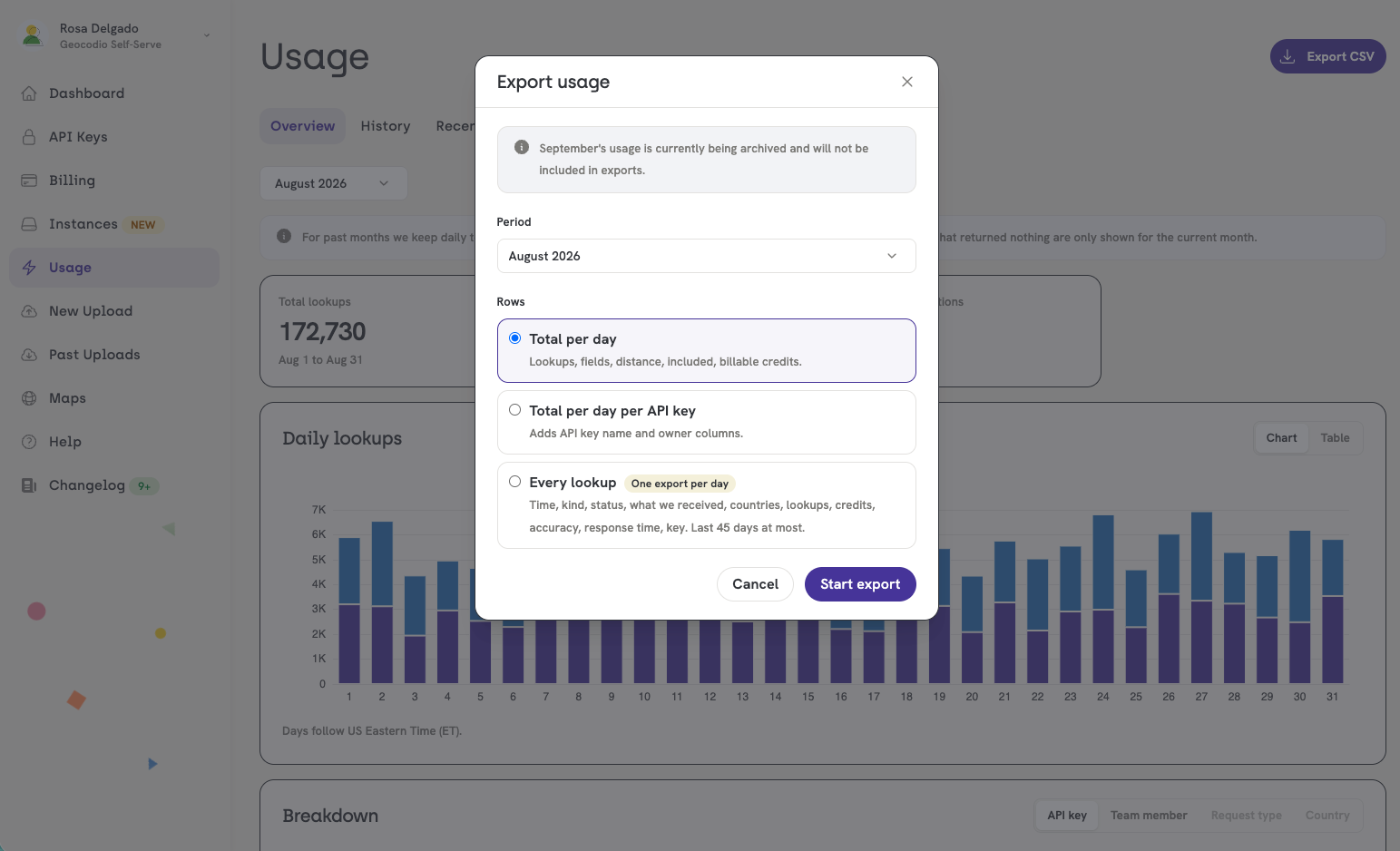
Exports run in the background, so you can close the page and Geocodio will email you a download link when the file is ready. It remains in “Recent exports” for 7 days.
Note for Geocodio Enterprise Customers:
Geocodio Enterprise never stores the input you send (i.e. the address or coordinates you sent us). On Enterprise accounts, Recent lookups and “Every lookup" exports exclude the input and include everything else.
Full column definitions and other details can be found in Exporting your usage.
Who Can See What
The usage page follows your team’s roles and permissions. Every role can see account totals. Owners, Admins, and Developers can see usage for every API key. Members can see their own keys by name and Recent lookups for their keys, with all other keys grouped into one “Other keys” row. Exports follow the same roles.
See Understanding your usage page for the full roles table.
Questions? Suggestions?
We'd love to hear what you think of the new usage page, and what else you'd like to see on it. You can always reach us at [email protected].
Related Resources
Understanding your usage page
A detailed walkthrough of the usage page, including term definitions and team roles table
Don't miss what's new
Geocodio ships new features and data updates regularly. We'll only email you with the good stuff, nothing else.
Thanks for subscribing! Check your inbox to confirm.