
Guides
for everything Geocodio
Guides
Credits
Guides
for everything Geocodio
Credits
You can pre-pay for your Geocodio usage by buying credits ahead of time. Credits are available to customers across all of our available plans:
Pay-As-You-Go: Buy your credit bundles upfront instead of waiting to be billed for your usage at the end of each month.
Flex: Depending on the Flex option you choose, you’ll be supplied with an allotment of credits to use while your subscription is active. You also have the ability to purchase top-up credits if you require more than the original amount provided.
Unlimited: Purchase distance credits to access and use our distance matrix API.
What is a credit?
A credit is the unit Geocodio uses to measure the cost of your usage. Every lookup you make draws one credit from your balance, whether that credit came from a Flex subscription or a pre-purchased bundle.
One lookup uses one credit. If a request adds up to 500 lookups, it uses 500 credits. This holds true no matter which type of lookup you are running - geocoding, data appends, distance calculation, etc - so you can easily calculate credit spend and cost by counting lookups.
For example, if you geocode 1,000 addresses and append Congressional districts to your results, you would anticipate 2,000 lookups to accrue during the job. This would require 2,000 credits to complete.
You can estimate your credit total by visiting our pricing calculator.
Two ways to get credits
There are two kinds of credits and they behave a little differently. You can use both at the same time.
Credit bundles you buy upfront
Anyone can buy credits ahead of time on any plan. Buying upfront lets you lock in a volume discount, simplify expense reporting, and bring more predictability to your geocoding bills.
How to buy credits: on the dashboard, or by invoice through the Geocodio team at [email protected] (Invoice payments are available to Flex and Unlimited customers).
Purchased credits never expire. Purchased credits roll over month to month for as long as you need them.
Credits are not refundable or transferrable. Credits have no cash value once purchased.
Credits apply right away. If you already have usage for the month when you buy credits, those credits are applied to your running balance immediately.
Credits included with a Flex subscription
Flex plans come with a set credit allowance each billing period. The allowance scales with the plan tier:
| Flex plan | Credits per month | Credits per year (annual billing) |
|---|---|---|
| Flex 350 | 350,000 | 4.5 million |
| Flex 650 | 650,000 | 9 million |
| Flex 850 | 850,000 | 12 million |
| Enterprise Flex | Annual Only | 500,000 |
The above amounts reflect credit allotments for a single user.
Additional subscription credits are granted as more users are added to a Flex account. See our pricing page for more details.
Subscription credits roll over from one period to the next, month to month or year to year, for as long as you have an active subscription. This applies even if you downgrade from one Flex tier to another or upgrade to Unlimited. If you downgrade to pay-as-you-go or cancel, the rollover stops.
Purchased vs. subscription credits
Purchased credits stay on your account even if you downgrade to pay-as-you-go. Subscription credits are valid as long as you have an active Flex or Unlimited subscription at any level.
If you need more than your plan's allowance, you can buy credit bundles on top of your subscription. Annual Flex and Unlimited customers receive a bonus discount on credit bundle purchases. See the pricing page for current rates.
What credits can be used for
On Flex plans, credits are shared across everything Geocodio does. The same pool covers:
US, Canada, Mexico and UK geocoding
Distance calculations
Appended data fields
You do not need separate credits for each type. Whatever you geocode draws from one balance. Remember to track your lookups across all of these options to determine the number of credits required to complete your job.
On Unlimited plans, credits are required for distance
Unlimited plans include geocoding and data appends within the cost of the subscription, but they do not include distance calculations. To use distance on an Unlimited plan, you'll need to buy credits to pay for your usage.
How the daily free tier works with credits
Every Pay-As-You-Go and Self-Service Flex account includes a free tier of 2,500 lookups per day. Geocodio uses this free tier first each day. Credits are drawn down only after the daily free tier is used up. The free tier does not roll over, so any unused free lookups are lost at the end of the day.
Volume discounts
Buying credits in larger bundles locks in a volume discount. The more you buy at once, the lower your effective rate:
| Bundle Size | Discount |
|---|---|
| 500,000+ | 5% |
| 1,000,000+ | 10% |
| 5,000,000+ | 15% |
| 10,000,000+ | 20% |
These discounts are available on every plan. Annual Flex and Unlimited customers receive an additional bonus discount on top of the volume discount. Our pricing page has the full details.
Auto-refill: keep credits topped up automatically
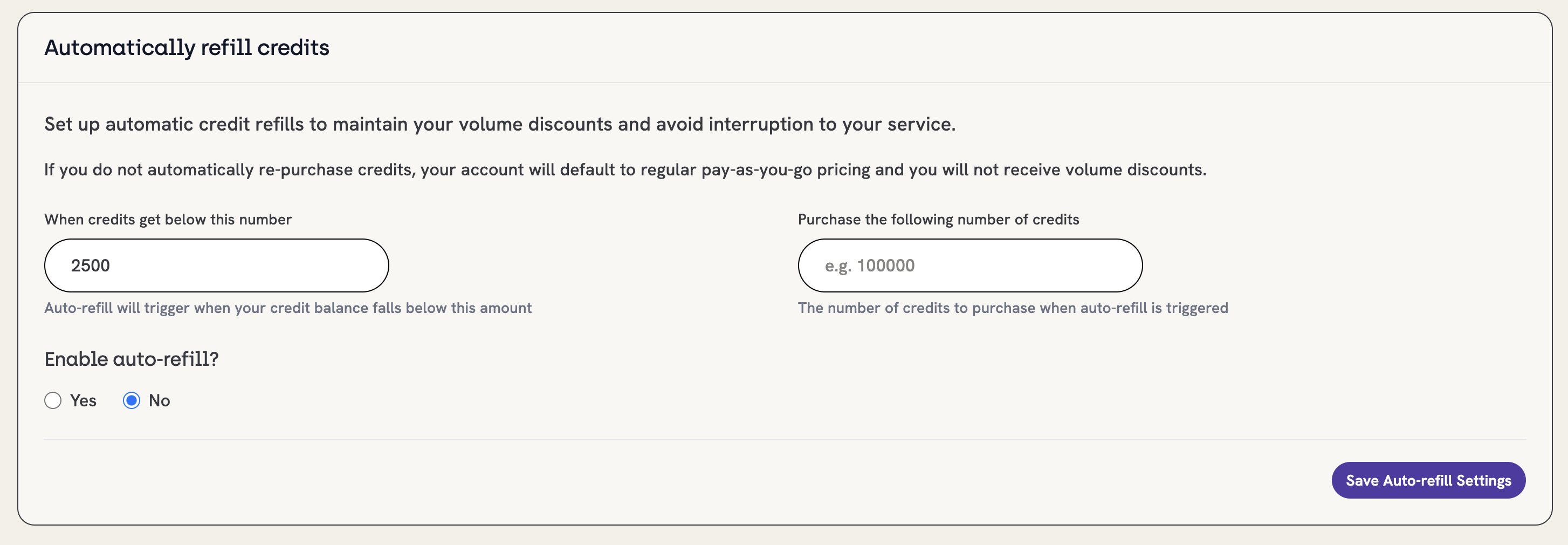
If you rely on credits for regular usage, you can set credits to auto-refill when they drop below a level you choose. When your balance hits that point, Geocodio buys a new batch of credits for you. Both the threshold and the refill amount are fully customizable. For example, you could set your account to buy 20,000 credits whenever your balance drops below 5,000.
Auto-refill is off by default. You can turn it on at any time, and turn it off again whenever you no longer need it.
Using credits to cap your usage (Pay-As-You-Go)
If you are on Pay-As-You-Go, you can use credits to put a hard cap on spending. Buy credits upfront, then set a Usage Limit to "Limit until I run out of credits." Once your prepaid credits are gone, the account stops geocoding beyond the free tier, so you never run up an unexpected bill.
When you want to lift the cap, remove the Usage Limit. Your account returns to regular Pay-As-You-Go billing, which is the default. Set a usage limit on the dashboard.